This is a simple xblock, connecting users to a classroom on Skyroom.
To install this xblock using tutor:
tutor config save --append OPENEDX_EXTRA_PIP_REQUIREMENTS=git+https://github.com/edSPIRIT/xblock-skyroom.git
# build the openedx image
tutor images build openedx
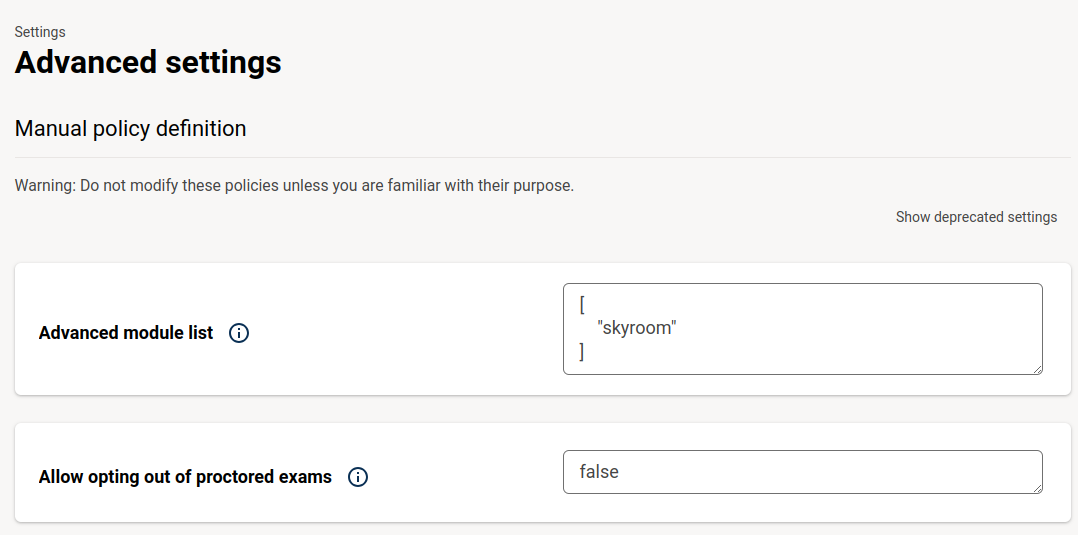
Inside your course, go to Settings -> Advanced Settings and add skyroom to the Advanced Module List.
Now when you add a new advanced component, you should see the Skyroom XBlock.


We need a SKYROOM_API_KEY to send a createLoginUrl request. if you're using tutor, create a new config variable called SKYROOM_API_KEY:
tutor config save -s SKYROOM_API_KEY="MY_SECRET_API_KEY"then, create a tutor plugin called skyroom.py in your plugins root directory like below:
from tutor import hooks
import os


hooks.Filters.ENV_PATCHES.add_item(
    (
        "openedx-common-settings",
        "SKYROOM_API_KEY = '{{ SKYROOM_API_KEY }}'"
    )
)
This will patch SKYROOM_API_KEY to both lms and cms. That's it!
Don't forget to enable the plugin using tutor plugins enable skyroom

If you would like to contribute to this project, please feel free to submit a pull request.
This project is licensed under the AGPLv3 License - see the LICENSE_ file for details.`