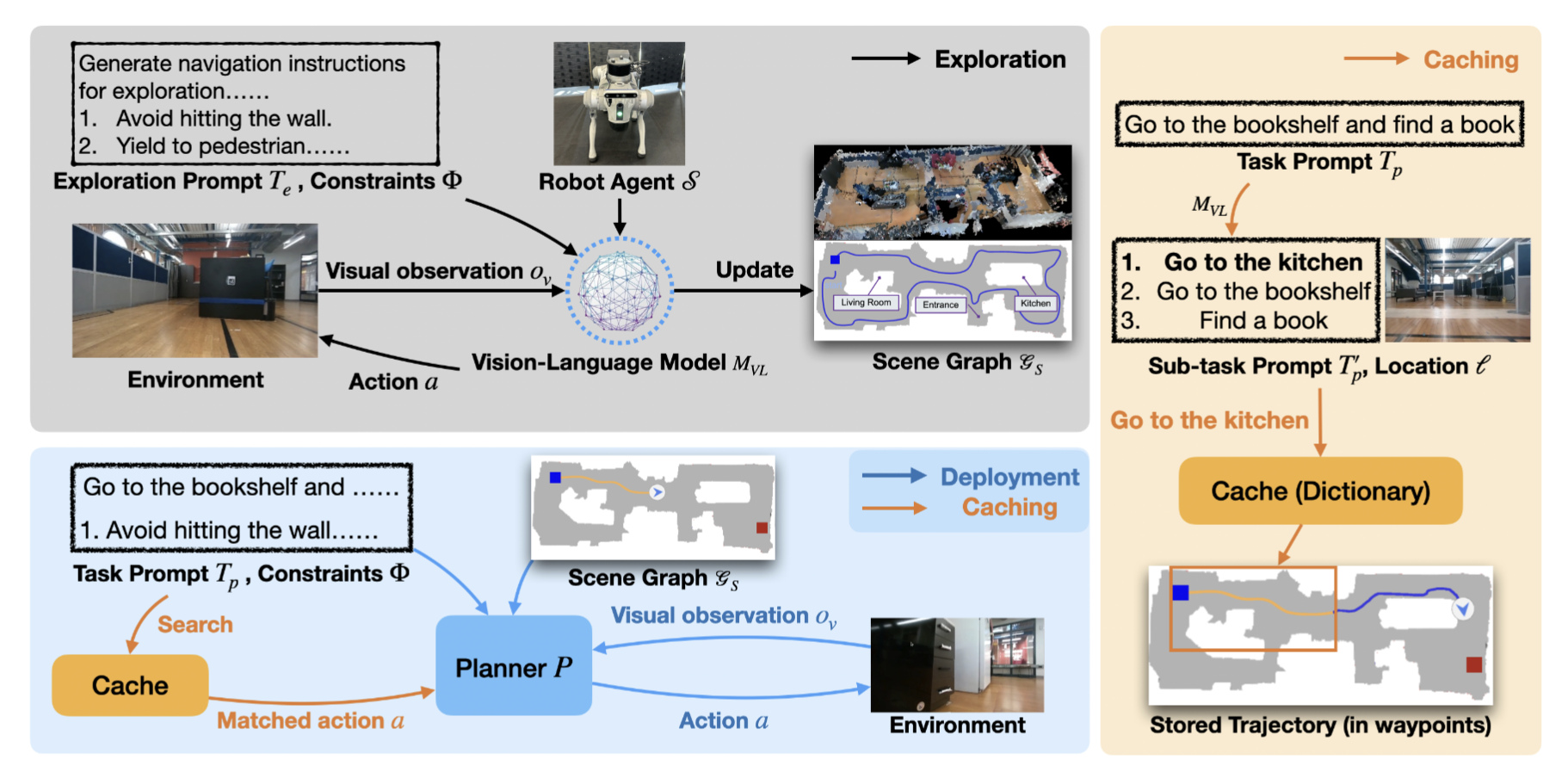
Rapid Exploration and Cache-Enabled Neurosymbolic Vision-Language Planning for Zero-Shot Transfer in Robot Navigation
- Clone this repo
git clone --recursive https://github.com/VLN-Zero/vln-zero.github.io.git
cd vln-zero.github.io- Make changes to the
habitat-labcode
In habitat-lab/habitat/utils/visualizations/maps.py, change lines 425-426 to the following:
    limit = topdown_map_info["limits"]
    # Crop the map to show only the agent and goal +- some buffer
    top_down_map = top_down_map[limit[0]:limit[1], limit[2]:limit[3]]
Also, in habitat-lab/habitat_baselines/rl/requirements.txt, remove lines 3-4 (the tensorflow==1.13.1 requirement is not needed).
- Setup your Conda environment
Use the following instructions to install all necessary dependencies.
conda create -n vln-zero python=3.8
source $(conda info --base)/etc/profile.d/conda.sh
conda activate vln-zero
wget https://anaconda.org/aihabitat/habitat-sim/0.1.7/download/linux-64/habitat-sim-0.1.7-py3.8_headless_linux_856d4b08c1a2632626bf0d205bf46471a99502b7.tar.bz2
conda install habitat-sim-0.1.7-py3.8_headless_linux_856d4b08c1a2632626bf0d205bf46471a99502b7.tar.bz2
# you can remove the tar after running this

cd habitat-lab/
# If pip's dependency resolver fails on the following instructions, run `python -m pip install --upgrade pip` and then try again.
python -m pip install -r requirements.txt
python -m pip install -r habitat_baselines/rl/requirements.txt # this should already have been modified in step 2
python -m pip install -r habitat_baselines/rl/ddppo/requirements.txt
python -m pip install -e .

cd ../
python -m pip install tokenizers==0.19.1
python -m pip install tensorboard
python -m pip install -r requirements.txt- Download data
Following the steps from the VLN-CE project, download the MP3D, R2R, and RxR datasets. The final structure should look like something like this.
VLN-Zero
├─ habitat-lab
├─ VLN_CE
│  ├─ data
│  │  ├─ datasets
│  │  │  ├─ R2R_VLNCE_v1-3
│  │  │  │  ├─ test
│  │  │  │  ├─ train
│  │  │  │  ├─ val_seen
│  │  │  │  ├─ val_unseen
│  │  │  ├─ R2R_VLNCE_v1-3_preprocessed
│  │  │  │  ├─ envdrop
│  │  │  │  ├─ joint_train_envdrop
│  │  │  │  ├─ test
│  │  │  │  ├─ train
│  │  │  │  ├─ val_seen
│  │  │  │  ├─ val_unseen
│  │  │  ├─ RxR_VLNCE_v0
│  │  │  │  ├─ train
│  │  │  │  ├─ val_seen
│  │  │  │  ├─ val_unseen
│  │  │  │  ├─ test_challenge
│  │  │  │  ├─ text_features
│  │  ├─ ddppo-models
│  │  ├─ res
│  │  ├─ scene_datasets
│  │  │  ├─ mp3d
To run our implementation, run bash eval_zero_vlnce.sh. The number of gpus used can me modified in this script. Make sure to set the OPENAI_API_KEY variable to your key (Warning! With multiple gpus in use, this script will use a LOT of API calls).
Results can be tracked by running python analyze_results.py --path YOUR_PATH
The evaluation can be killed by running bash kill_zero_eval.sh
These scripts were taken from NaVid-VLN-CE.
Please cite with
@misc{anonymous2025vlnzerorapidexplorationcacheenabled,
      title={VLN-Zero: Rapid Exploration and Cache-Enabled Neurosymbolic Vision-Language Planning for Zero-Shot Transfer in Robot Navigation},
      author={Anonymous},
      year={2025},
      url={https://vln-zero.github.io/},
}