Releases: QoderAI/changelog-QoderWork
Message Recall

Press ↑/↓ in the chat input to cycle through your previous messages — just like a terminal.
✨ New
- Arrow-key message recall
Press ↑ or ↓ in the input box to instantly recall messages you've sent in the current conversation. Edit and resend without retyping.
🐛 Fixes
- Fixed in-chat search accuracy, IM channel sync issues, and other daily-use annoyances
- Resolved several crashes for improved overall stability
Everyday Polish
General stability and quality-of-life improvements.
Network Proxy
QoderWork now supports global network proxy configuration — use it behind corporate firewalls or restricted networks without issues. You can also search across all conversations to quickly locate past tasks.
✨ New
- Network proxy
Configure a global proxy in Settings to route all network traffic through it — works behind corporate firewalls and restricted environments. - Global task search
Search across all your conversations to quickly find past tasks and messages.
🐛 Fixes
- Resolved various issues including HTML preview rendering, glass theme display, and credit usage icon visibility.
Task Groups
Conversations can now be organized into groups — managing a busy task list just got easier. This release also addresses a number of quality-of-life issues.
✨ New
- Task groups
Organize your conversations into groups, making it easier to find what you need when tasks pile up.
🐛 Fixes
- Resolved various issues including sidebar layout and Windows upgrade stability.
Everyday Polish
General stability and quality-of-life improvements.
DingTalk Workspace CLI
QoderWork now connects to the DingTalk Workspace CLI — manage todos, reports, attendance, and 10+ modules in natural conversation.
✨ New
- DingTalk Workspace CLI (DWS)
Enable the DingTalk connector and use natural language to manage todos, daily reports, attendance, calendar, approvals, and more. No more navigating pages and clicking buttons — just say what you need.

🔧 Improvements
- Guided connector setup Connectors now offer a step-by-step setup flow with automatic authentication — faster onboarding, fewer manual steps.
- Input bar refinements Improved connector grouping and behavior in the chat input.
🐛 Fixes
- Resolved various issues related to conversation cancellation, connector display, IM channel list, and overall page stability.
Expert Kits: Now Available
The past few releases focused on ongoing stability and experience improvements. With 0.3.15, we're introducing Expert Kits — 10 built-in kits covering legal, finance, contract management, product management and more, turning AI from a generalist into a domain expert. Custom kit creation and sharing are also supported.
Expert Kits don't just connect AI to tools — they give AI professional-grade capabilities for specific roles.
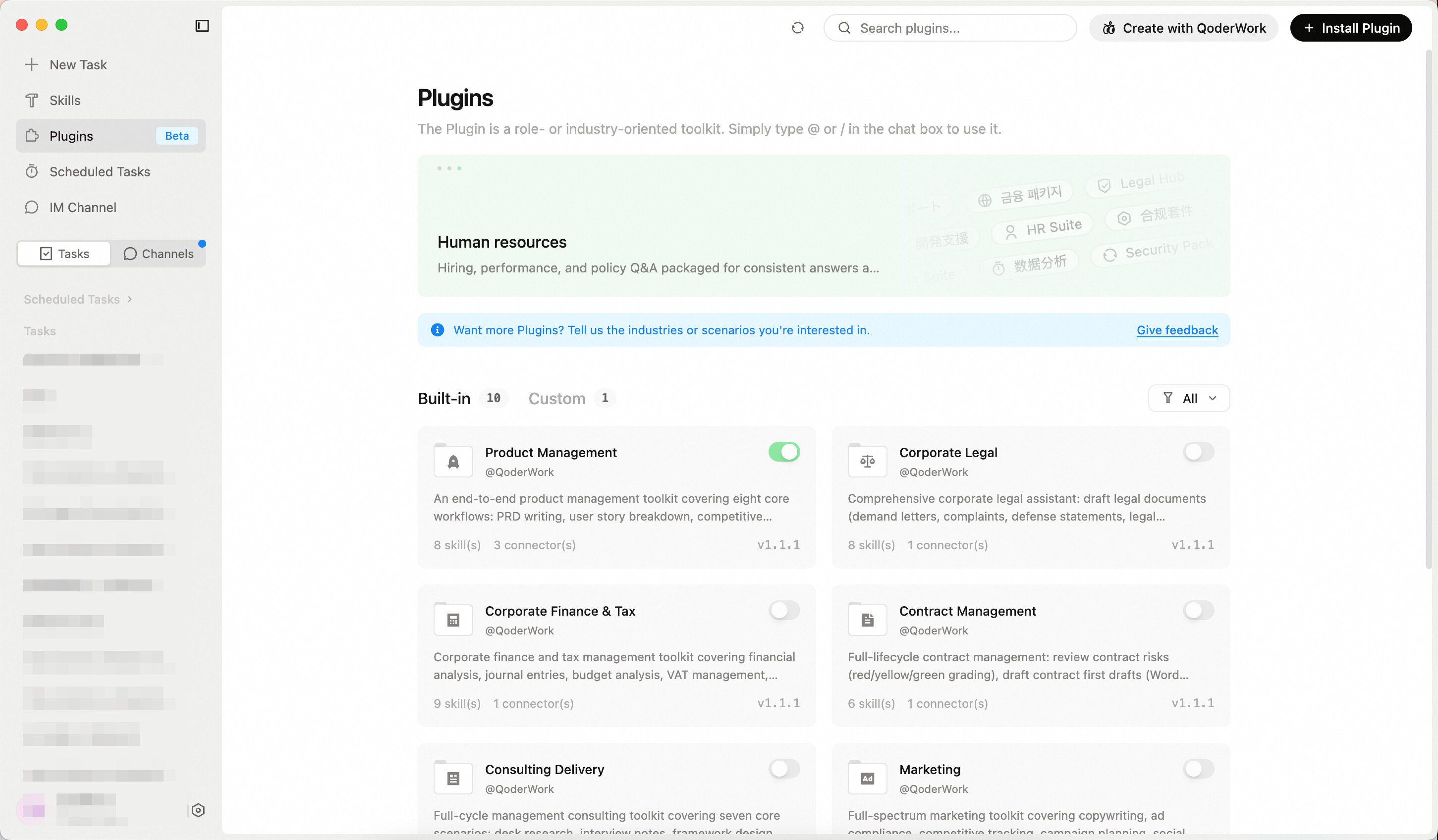
✨ New
- 10 Built-in Kits at Launch
Covering finance, legal, marketing, and more — ready to use out of the box.
Multiple kits can be used in a single conversation. For example, combine "Contract Management" and "Corporate Legal" to handle legal review and contract generation in the same workflow.
| Kit | Description |
|---|---|
| Product Management | PRD writing, user story breakdown, competitive analysis, requirement prioritization, user feedback analysis, roadmap updates, product metrics review |
| Corporate Legal | Draft legal documents, generate corporate resolutions, case research with win-rate analysis, compliance review, risk assessment |
| Contract Management | Contract review, contract drafting, redline comparison, NDA quick screening, statute lookup, contract ledger reminders |
| Corporate Finance & Tax | Financial analysis, bookkeeping vouchers, budget analysis, VAT management, annual settlement, internal audit, financial statements, month-end closing |
| Consulting Delivery | Desk research, interview notes, framework design, report writing, benchmarking, weekly reports, CEO briefings |
| Marketing | Marketing copy, ad compliance, competitor tracking, campaign planning, social media trending, SEO optimization, campaign analytics, brand consistency review |
| Investment Research | In-depth reports, industry research, annual report analysis, earnings flash reviews, research notes, morning meeting briefs, research summaries, comparable company analysis |
| Investment Banking | IPO prospectus drafting, M&A reports, bond offering memorandums, exchange inquiry responses, roadshow materials, financial modeling |
| Private Equity | Project screening, due diligence checklists, term sheet review, investment committee memos, return modeling, exit analysis |
| Wealth Management | Market briefings, asset allocation, fund analysis, client reporting, financial planning, tax planning |
Everyday Improvements
Versions 0.3.8 through 0.3.11 bring a wide range of everyday usability improvements.
🔧 Improvements
- Settings Page
Refined layout and updated copy
🐛 Fixes
- Fixed various issues affecting daily usage
- Fixed several Windows platform compatibility issues
- Additional stability improvements
Desktop Control from IM
This release bridges IM and desktop — control your tasks right from your IM conversations, with new capabilities like Generative UI.
✨ New
- IM Binding
Use /bind in any IM conversation to connect to an active desktop task — interact with it remotely, anytime, anywhere. The desktop UI shows binding status in real time, and /unbind disconnects when you're done. - Generative UI (experimental)
Agents can now go beyond text — they can render interactive components like buttons and tables right in the conversation. To try it, flip its toggle under Experimental Features in Settings. - Context usage indicator
A new indicator below the input box shows context usage — when it's full, start a new task to save credits.

🔧 Improvements
- Simplified DingTalk bot setup
You can now scan a QR code directly in the IM channel to create and configure the DingTalk bot — faster and easier than before.
🐛 Fixes
- Fixed UI issues including thinking-mode scroll jumping, Windows desktop shortcut loss, and image path display
- Fixed functional issues with skill market sharing/installation and IM card status sync
- Fixed MCP authentication and CJK URL auto-linking
- Reduced idle resource usage
Skill Sharing
This release introduces Skill Sharing, WeCom bot integration, and a Microsoft 365 connector, along with on-demand MCP tool loading and a redesigned browser extension.
✨ New
- Skill Sharing
Share skills you’ve created directly with others—recipients can install them with a single click. - WeCom Bot
A new WeCom channel lets you chat with QoderWork right inside WeCom. - Microsoft 365 Connector
Connect to data and services across the Microsoft 365 ecosystem.
🔧 Improvements
- On-Demand MCP Loading
MCP tools now load on demand instead of all at once, resulting in faster startup times. - Browser Extension Upgrade
The browser extension has been completely redesigned for a smoother experience and improved stability. - DingTalk and Feishu IM now support streaming output
🐛 Fixes
- Fixed interaction issues including message attachments not opening on click and Command+F clearing search text
- Fixed functional issues with skill installation and scheduled task history display
- Fixed various issues in Feishu and DingTalk IM