git-try is a command that will generate a diff against the latest origin/master and submit that patch as a parameter to Jenkins.
See https://codeascraft.com/2011/10/11/did-you-try-it-before-you-committed/ for motivations and inspirations
Move the git-try file to /usr/local/bin/git-try
bash$ git try
When first used, git-try will prompt for a few pieces of information:
- JENKINS_URL: The base URL for your Jenkins installation (something like http://jenkins.yourdomain.com/)
- JOB_NAME: The job that should get kicked off in Jenkins
- USERNAME: Your Jenkins username
- API_TOKEN: Your Jenkins API token. This can be found at http://jenkins.yourdomain.com/user/${USERNAME}/configure
You'll need a job on Jenkins that runs your unit tests (or whatever other build/test steps you'd like the git-try command to run). Furthermore, you'll need to configure a File Parameter named patchfile.
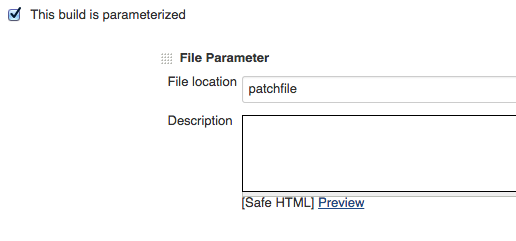
At the beginning of your jobs build steps, you'll want to apply the patch:
#!/bin/bash

git apply patchfile

# your other build steps follow