MSBuild uses environment variables as MSBuild properties so that the %AppData% environment variable is available as MSBuild property $(AppData).
Note: [MSBuild]::IsOSPlatform('Windows') seems available since MSBuild 15.3.
Paths to secrets files are different depending of the operating system. Therefore to properly display secrets.json in Visual Studio Solution Explorer to detect the operating system:
  <ItemGroup>
	<None Include="$(AppData)\Microsoft\UserSecrets\$(UserSecretsId)\secrets.json" Visible="true" Condition="$([MSBuild]::IsOSPlatform('Windows'))" />
	<None Include="$(Home)/.microsoft/usersecrets/$(UserSecretsId)/secrets.json" Visible="true" Condition="!$([MSBuild]::IsOSPlatform('Windows'))" />
  </ItemGroup>
Updating the .csproj file with these conditions make the secrets.json file available to the project and VS Extention like SlowSheetah can therefore perform operations.
This can be repeated with the secrets.{environment}.json files.
Conditions should be added too, but for brievety are not incuded.
Example of environment secret files with a generic path:
  <ItemGroup>
    <None Include="$(AppData)\Microsoft\UserSecrets\$(UserSecretsId)\secrets.Release.json" Link="secrets.Release.json" />
  </ItemGroup>

  <ItemGroup>
    <None Include="$(AppData)\Microsoft\UserSecrets\$(UserSecretsId)\secrets.Debug.json" Link="secrets.Debug.json" />
  </ItemGroup>
When using SlowCheetah VS Extension to add transforms to the secrets.json file, transformations files are correctly created in the secrets.json directory but with a path relative to the current project .csproj file.
To simplify path management define a property $(SecretPath).
The final configuration when using SlowCheetah is provided below:
	<PropertyGroup>
		<SecretPath Condition="$([MSBuild]::IsOSPlatform('Windows'))">$(AppData)\Microsoft\UserSecrets\$(UserSecretsId)\</SecretPath>
		<SecretPath Condition="!$([MSBuild]::IsOSPlatform('Windows'))">$(Home)/.microsoft/usersecrets/$(UserSecretsId)/</SecretPath>
	</PropertyGroup>

  <ItemGroup>
	<None Include="$(SecretPath)secrets.json" Visible="true">
	  <TransformOnBuild>true</TransformOnBuild>
	</None>
  </ItemGroup>

	<ItemGroup>
		<None Include="$(SecretPath)secrets.Release.json">
			<IsTransformFile>true</IsTransformFile>
			<DependentUpon>secrets.json</DependentUpon>
		</None>
	</ItemGroup>

	<ItemGroup>
		<None Include="$(SecretPath)secrets.Debug.json">
			<IsTransformFile>true</IsTransformFile>
			<DependentUpon>secrets.json</DependentUpon>
		</None>
	</ItemGroup>
The main issue is that when keeping <TransformOnBuild> and <IsTransformFile> set, the secrets.json is considered a transfiormation file and output to the build directory.
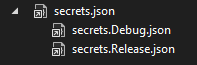
The following minimal configuration does preserve the relationships between the files in the Solution Explorer while not outputing secrets.json in the build:
  <PropertyGroup>
    <SecretPath Condition="$([MSBuild]::IsOSPlatform('Windows'))">$(AppData)\Microsoft\UserSecrets\$(UserSecretsId)\</SecretPath>
    <SecretPath Condition="!$([MSBuild]::IsOSPlatform('Windows'))">$(Home)/.microsoft/usersecrets/$(UserSecretsId)/</SecretPath>
  </PropertyGroup>

  <ItemGroup>
	<None Include="$(SecretPath)secrets.json"/>
	<None Include="$(SecretPath)secrets.Release.json">
	  <DependentUpon>secrets.json</DependentUpon>
	</None>
	<None Include="$(SecretPath)secrets.Debug.json">
      <DependentUpon>secrets.json</DependentUpon>
	</None>
  </ItemGroup>
The result is as below: